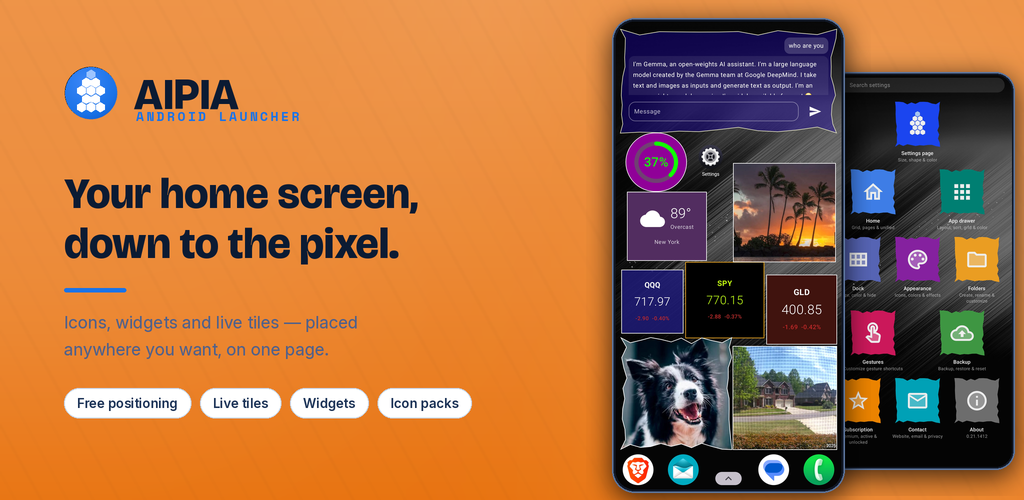
home.mp4
/videos/home.mp4
— clip coming —
— clip coming —
- Place & move icons, folders, tiles, widgets
- Drop onto a tile or widget (layering)
- Split vs unified
- Grid & cell size
- Lock screen
- Lock layout
icon_config.mp4
/videos/icon_config.mp4
— clip coming —
— clip coming —
- Icon pack
- Icon shape
- Per-app custom icon
- Rename
- Hide
- Uninstall
drawer.mp4
/videos/drawer.mp4
— clip coming —
— clip coming —
- Horizontal vs vertical
- Page indicator
- Infinite scroll
- Search
- Sort types
- Icon size
- Panel tint & opacity
- Band color
dock.mp4
/videos/dock.mp4
— clip coming —
— clip coming —
- Dock size
- Background color
- Home-screen button
- Hide the dock
basic_tiles.mp4
/videos/basic_tiles.mp4
— clip coming —
— clip coming —
advanced_tiles.mp4
/videos/advanced_tiles.mp4
— clip coming —
— clip coming —
- Weather, date, clock, battery & photo
- Stock & AI tiles (bring your key)
- Background & contour color
- Shape & overlap
Getting your API keys
Stock tiles — free key from Finnhub or Twelve Data. Free-tier quotes are delayed, not real-time.
AI tile — bring a key from your provider: Google Gemini (free tier available but rate-limited and often unreliable — a pay-as-you-go key runs smoothly; e.g. gemini-3.1-flash-lite), OpenAI, or Anthropic Claude.
Your keys stay yours — every key is encrypted on your device and stored only there. Requests go straight from your phone to the provider; AIPIA has no server in between and can never see, use, or transmit your key.
folders.mp4
/videos/folders.mp4
— clip coming —
— clip coming —
- Create a folder
- Folder icon
- Background color
- Add / remove apps
- Overlap a tile / widget
gestures.mp4
/videos/gestures.mp4
— clip coming —
— clip coming —
- Home-screen gestures
- Drawer gestures
- Config-page gestures
- Assign an action
settings_page.mp4
/videos/settings_page.mp4
— clip coming —
— clip coming —
- Tile shape
- Tile color
- Tile size
- Landscape two-panel
backup.mp4
/videos/backup.mp4
— clip coming —
— clip coming —
- Backup to a file
- Restore from a file
- Reset all settings
- Clear home layout
Tap a clip to watch it — it grows in place and plays with sound. Only one clip plays at a time; opening another stops the previous one.